> ## Documentation Index
> Fetch the complete documentation index at: https://signalpilot.ai/docs/llms.txt
> Use this file to discover all available pages before exploring further.
# SignalPilot: Introduction
> AI agent with full org context that ChatGPT or IDE copilots can't access
## Agentic Harness for Fast Moving Data Teams
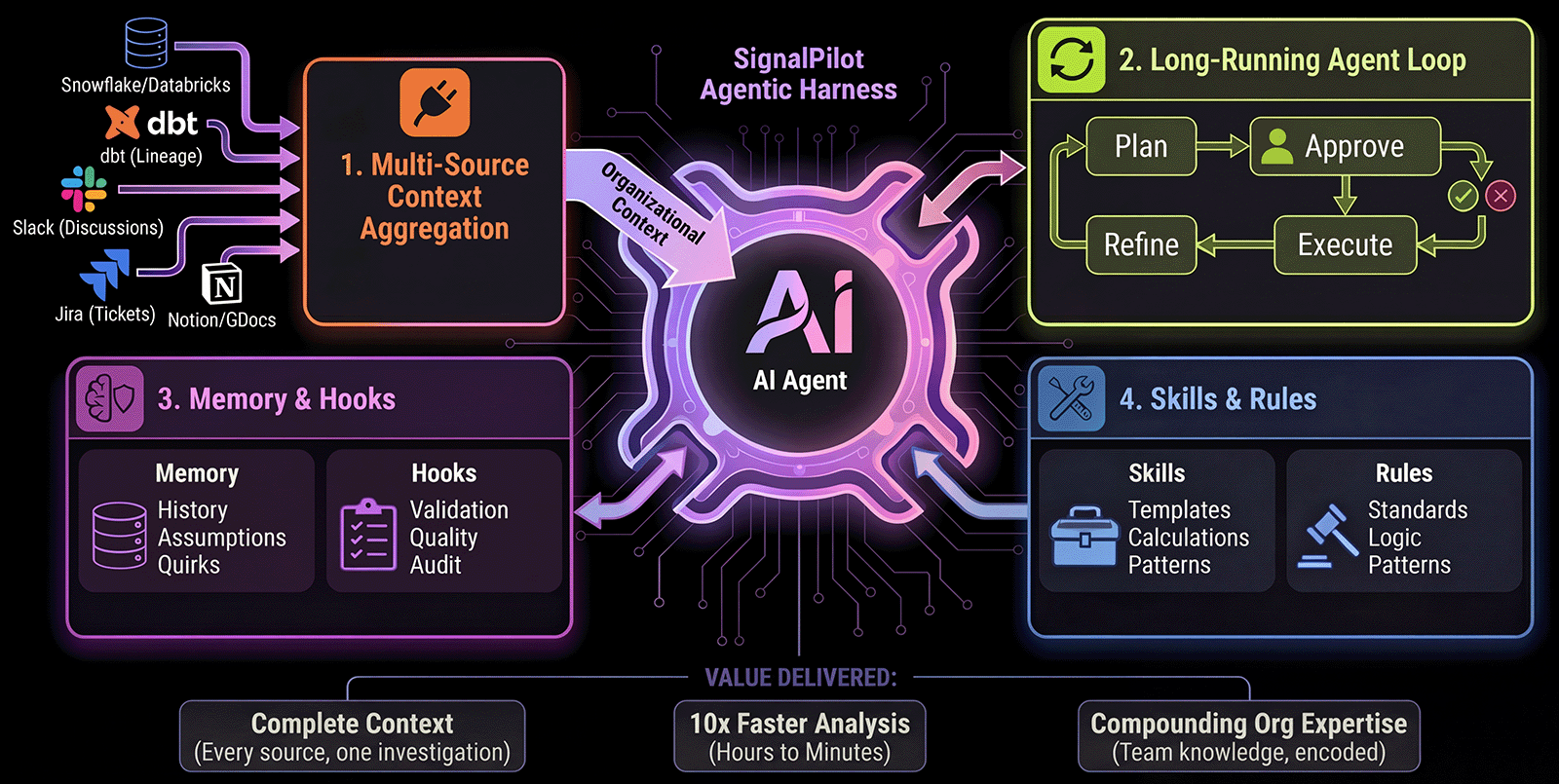
**SignalPilot** is a Jupyter-native AI agentic harness that investigates data by connecting to your **db warehouse, dbt lineage, query history, slack threads, notion, and Jira tickets** — giving the AI institutional knowledge that coding assistants like ChatGPT and copilots can't access.
 **Aggregates organizational knowledge**
Db warehouse, db warehouse, dbt lineage, database schemas, Slack discussions, Jira tickets, past investigations
**Plans, Executes, Iterates**
Not single-shot completions — continuous loop until task complete with analyst-in-the-loop
**Remembers institutional knowledge**
Past hypotheses, validated assumptions, known data quirks, MCP subagent
**Teach SignalPilot your domain**
Custom skills (reusable analysis patterns), coding standards (imports, style), business logic (revenue formulas)
**🔒 Zero data retention** • **Read-only access** • **Local-first execution** • **SOC 2 in progress**
***
## How is SignalPilot different from ChatGPT or Copilot?
**ChatGPT and IDE copilots** are general-purpose code generators. **SignalPilot** is purpose-built for data investigation:
**ChatGPT/Copilots:** Manual copy-paste or code files only
**SignalPilot:** Auto-connects to dbt, databases, Slack, Jira, query history via MCP
**ChatGPT/Copilots:** Single-shot responses or single-file edits
**SignalPilot:** Long-running loop with analyst-in-the-loop approval
**ChatGPT/Copilots:** No memory between sessions or notebooks
**SignalPilot:** Remembers hypotheses, assumptions, data quirks
**ChatGPT/Copilots:** Generic suggestions
**SignalPilot:** Your team's skills, rules, and business logic
**Why "harness"?** SignalPilot provides the infrastructure that lets AI work on complex data investigations while keeping you in control.
SignalPilot vs ChatGPT vs Copilot — Head-to-head workflows + when to use each
## One Minute Installer
**Prerequisites:** macOS, Linux, or Windows (WSL) • uv • Internet connection
**Don't have [uv](https://docs.astral.sh/uv/getting-started/installation/)?** Install it first (takes seconds):
```bash theme={null}
curl -LsSf https://astral.sh/uv/install.sh | sh
```
Or see [uv installation guide](https://docs.astral.sh/uv/getting-started/installation/) for other methods (Homebrew, Windows, etc.)
**Then install SignalPilot:**
```bash theme={null}
uvx signalpilot
```
**What happens:**
```bash theme={null}
✓ Creating workspace at ~/SignalPilotHome
✓ Installing isolated Python 3.12 + Jupyter Lab + SignalPilot extension
✓ Installing data packages (pandas, numpy, matplotlib, plotly...)
✓ Optimizing Jupyter cache for fast startup
⚡ Setup complete in 1m 10s
→ Launching Jupyter Lab at http://localhost:8888
```
**Option 1: Using uvx (recommended)**
```bash theme={null}
uvx signalpilot home
```
**Option 2: Manual activation**
```bash theme={null}
cd ~/SignalPilotHome
source .venv/bin/activate && jupyter lab
```
Alternative methods, manual installation (pip, conda, uv), troubleshooting
## Get Started in 3 Steps
```bash theme={null}
uvx signalpilot home
```
Opens Jupyter Lab in your SignalPilot workspace at `http://localhost:8888`
`uvx signalpilot home` is shorthand for `uvx signalpilot lab --home`
When creating notebooks, always use the **default Python 3 kernel**. SignalPilot uses this kernel and may not work with other kernels due to missing system variables.
Run the installer first:
```bash theme={null}
uvx signalpilot
```
Takes \~2 minutes to set up everything
**Start immediately with local files:**
* Type `@` in chat to mention any CSV, Excel, or data file from the `data/` folder
* Home workspace: `~/SignalPilotHome/data/`
* Project folder: `./data/` in current working project directory
**Add more folders:** Use the **File Scanner** tool in the left sidebar to index additional directories.
**Connect databases:** PostgreSQL, Snowflake, BigQuery for warehouse access.
Connect PostgreSQL, Snowflake, BigQuery
Reference local files, dataframes, and databases
> "Show me the top 10 customers by revenue this month"
SignalPilot generates a plan → you approve → it executes
Complete walkthrough with real example
***
## Learn More
**4 foundational systems explained**
MCP context layer, long-running loop, memory & hooks, skills & rules
**vs ChatGPT vs IDE Copilots**
Full comparison + real-world investigation example
**Read-only, local-first, zero retention**
SOC 2 in progress, GDPR compliant, audit trail
**Connect your data stack**
PostgreSQL, Snowflake, dbt, Slack, Jira, and more
***
## Resources
5-minute investigation walkthrough
Commands and troubleshooting
Customize behavior and rules
Get help and share use cases
Report issues and contribute
Full concepts and guides
**Aggregates organizational knowledge**
Db warehouse, db warehouse, dbt lineage, database schemas, Slack discussions, Jira tickets, past investigations
**Plans, Executes, Iterates**
Not single-shot completions — continuous loop until task complete with analyst-in-the-loop
**Remembers institutional knowledge**
Past hypotheses, validated assumptions, known data quirks, MCP subagent
**Teach SignalPilot your domain**
Custom skills (reusable analysis patterns), coding standards (imports, style), business logic (revenue formulas)
**🔒 Zero data retention** • **Read-only access** • **Local-first execution** • **SOC 2 in progress**
***
## How is SignalPilot different from ChatGPT or Copilot?
**ChatGPT and IDE copilots** are general-purpose code generators. **SignalPilot** is purpose-built for data investigation:
**ChatGPT/Copilots:** Manual copy-paste or code files only
**SignalPilot:** Auto-connects to dbt, databases, Slack, Jira, query history via MCP
**ChatGPT/Copilots:** Single-shot responses or single-file edits
**SignalPilot:** Long-running loop with analyst-in-the-loop approval
**ChatGPT/Copilots:** No memory between sessions or notebooks
**SignalPilot:** Remembers hypotheses, assumptions, data quirks
**ChatGPT/Copilots:** Generic suggestions
**SignalPilot:** Your team's skills, rules, and business logic
**Why "harness"?** SignalPilot provides the infrastructure that lets AI work on complex data investigations while keeping you in control.
SignalPilot vs ChatGPT vs Copilot — Head-to-head workflows + when to use each
## One Minute Installer
**Prerequisites:** macOS, Linux, or Windows (WSL) • uv • Internet connection
**Don't have [uv](https://docs.astral.sh/uv/getting-started/installation/)?** Install it first (takes seconds):
```bash theme={null}
curl -LsSf https://astral.sh/uv/install.sh | sh
```
Or see [uv installation guide](https://docs.astral.sh/uv/getting-started/installation/) for other methods (Homebrew, Windows, etc.)
**Then install SignalPilot:**
```bash theme={null}
uvx signalpilot
```
**What happens:**
```bash theme={null}
✓ Creating workspace at ~/SignalPilotHome
✓ Installing isolated Python 3.12 + Jupyter Lab + SignalPilot extension
✓ Installing data packages (pandas, numpy, matplotlib, plotly...)
✓ Optimizing Jupyter cache for fast startup
⚡ Setup complete in 1m 10s
→ Launching Jupyter Lab at http://localhost:8888
```
**Option 1: Using uvx (recommended)**
```bash theme={null}
uvx signalpilot home
```
**Option 2: Manual activation**
```bash theme={null}
cd ~/SignalPilotHome
source .venv/bin/activate && jupyter lab
```
Alternative methods, manual installation (pip, conda, uv), troubleshooting
## Get Started in 3 Steps
```bash theme={null}
uvx signalpilot home
```
Opens Jupyter Lab in your SignalPilot workspace at `http://localhost:8888`
`uvx signalpilot home` is shorthand for `uvx signalpilot lab --home`
When creating notebooks, always use the **default Python 3 kernel**. SignalPilot uses this kernel and may not work with other kernels due to missing system variables.
Run the installer first:
```bash theme={null}
uvx signalpilot
```
Takes \~2 minutes to set up everything
**Start immediately with local files:**
* Type `@` in chat to mention any CSV, Excel, or data file from the `data/` folder
* Home workspace: `~/SignalPilotHome/data/`
* Project folder: `./data/` in current working project directory
**Add more folders:** Use the **File Scanner** tool in the left sidebar to index additional directories.
**Connect databases:** PostgreSQL, Snowflake, BigQuery for warehouse access.
Connect PostgreSQL, Snowflake, BigQuery
Reference local files, dataframes, and databases
> "Show me the top 10 customers by revenue this month"
SignalPilot generates a plan → you approve → it executes
Complete walkthrough with real example
***
## Learn More
**4 foundational systems explained**
MCP context layer, long-running loop, memory & hooks, skills & rules
**vs ChatGPT vs IDE Copilots**
Full comparison + real-world investigation example
**Read-only, local-first, zero retention**
SOC 2 in progress, GDPR compliant, audit trail
**Connect your data stack**
PostgreSQL, Snowflake, dbt, Slack, Jira, and more
***
## Resources
5-minute investigation walkthrough
Commands and troubleshooting
Customize behavior and rules
Get help and share use cases
Report issues and contribute
Full concepts and guides